
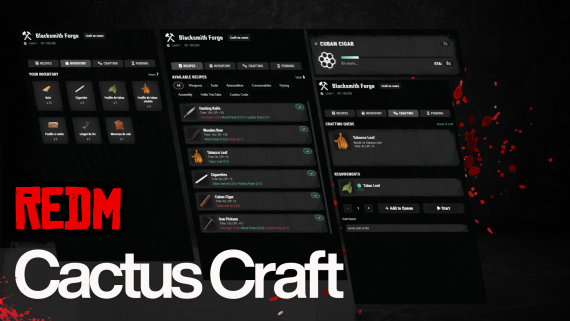
Cactus Craft - Advanced Crafting System
Description
Cactus Craft is a premium, feature-rich crafting system designed specifically for RedM servers.
Built with performance, stability, and user experience in mind, it provides a complete crafting solution with a fully UI interface.
Ready-to-use with automatic SQL implantation directly into your database.
ALL FRAMEWORK
Preview : https://youtu.be/88O4BdqhB8o
Key Features
- Authentic western-inspired user interface
- Optimized performance with server protection limits
- Real-time progress tracking with ETA display
- Queue system for multiple crafts
- Unlimited custom crafting stations
- Built-in XP and leveling system (optional)
- Smart inventory management with auto ingredient reservation
- Responsive design for all screen resolutions
- Intuitive configuration for recipes, stations, and categories
- Support for custom item images and station logos
- Pending system to claim finished crafts from any station
- Per-craft animations with props attachment system
Screenshots Overview
Main Crafting Interface
- Clean recipe browser with category filters
- Ingredient availability in real time
- Level-based recipe locking system
- Quantity controls
Progress Sidebar
- Multiple concurrent crafts
- Live progress tracking
- Completion notifications
Inventory & Pending Management
- Smart inventory display with item counts
- Pending crafts claimable from any station
- One-click claim system
Technical Information
Requirements
- jo_libs (https://github.com/Jump-On-Studios/RedM-jo_libs)
- MySQL Database (oxmysql)
- Ox_lib
Performance Features
- Optimized database queries with configurable limits
- Efficient UI updates with minimal DOM manipulation
- Automatic memory management and cleanup
- Server thread protection against overloads
Compatible Frameworks
- VORP
- RedEM:RP old
- RedEM:RP 2023 (reboot)
- QBR
- QR
- RSG
- RPX
- TPZ
Functions
Installation & Configuration — Setup Process
- Drag & drop into your resources folder
- Automatic SQL implantation into your database
- Configure recipes in
config.lua - Add custom images in the
img/folder - Start the resource from
server.cfg
Customization Options
- Unlimited recipe creation with custom ingredients, times, and XP rewards
- Flexible station setup with unique categories
- Customizable visuals (logos, colors, UI elements)
- Adjustable performance settings
- Per-recipe animation and props definitions with station defaults
Animations & Props System
- Assign a specific animation or scenario per recipe or per station
- Attach multiple props to defined bones with position and rotation offsets
- Optional loop, duration, and flags per animation
- Automatic prop cleanup and safe fallback if an animation is unavailable
- Station defaults with recipe-level overrides